Rust Embedded Graphics Subviews: Choose Cropped or Clipped Coordinates Before Reusing a Widget
A widget that renders correctly at the display origin can move twice when placed inside a subview. Before changing the widget’s geometry, decide which layer owns the offset and which layer enforces the drawing boundary. Rust embedded-graphics exposes those as separate choices.
This article uses embedded-graphics 0.8.2 and embedded-graphics-core 0.4.1, the versions shown in the official documentation checked on 19 October 2026. The examples are coordinate arithmetic and proposed rendering fixtures; no Rust build or display test was executed. The parent target is assumed to have an already-qualified pixel driver.
Choose the widget’s coordinate contract
A local-origin widget receives coordinates relative to its own placement. A parent-coordinate widget receives coordinates in the surrounding display’s space. Either convention can work, but the call boundary should state which one is expected.
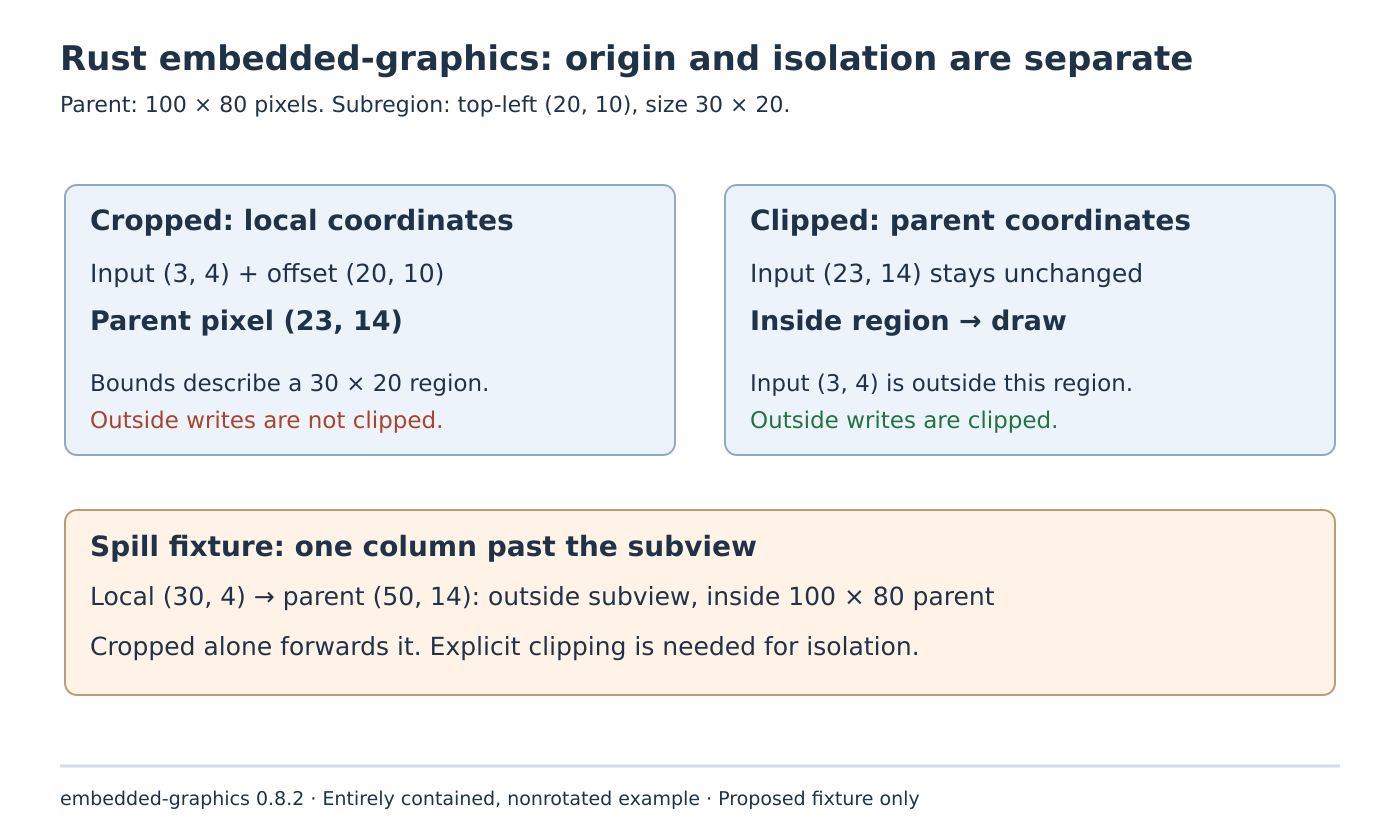
For an illustrative parent of 100 by 80 pixels, choose an entirely contained subregion starting at (20, 10) with size 30 by 20. A local widget point (3, 4) belongs at parent point (23, 14). Record both values when diagnosing a displacement. Logging only “point 23,14” hides whether the offset has already been applied.
The DrawTargetExt reference distinguishes the adapters: cropped() moves the local origin to the selected area’s top-left, while clipped() keeps the parent’s coordinate system. Cropping does not clip operations outside its reported bounds; clipping does enforce its boundary.
The Dimensions contract also allows a draw target’s bounding box to begin away from zero. Code that accepts an arbitrary target should therefore inspect its bounding box instead of silently assuming that every target is origin-based.
Locate a double offset with one asymmetric point
Pass the local point (3, 4) to the cropped subtarget in this fixture. Its offset maps the point to (23, 14) in the parent. That is the intended location.
Now suppose the application first adds the placement and passes (23, 14) to that same cropped target. The adapter adds the placement again, producing (43, 24). The point can remain visible inside the selected subregion, so a double-offset defect does not necessarily appear as an entirely blank widget.
Use an asymmetric collection of points rather than a centered square: for example, a distinctive corner marker and a short arm extending in only one direction. Record expected parent coordinates before drawing. A screenshot with a recognizable shape in approximately the right area is weaker evidence than a coordinate-level comparison.
For the clipped target, the intended point remains (23, 14) because the parent coordinate system is unchanged. Passing local point (3, 4) instead puts it outside this clip rectangle, so it is rejected. The resulting missing pixel can look like a driver problem even though the adapter followed its contract.
Test boundary enforcement separately from placement
The example subregion covers parent x-coordinates 20 through 49 and y-coordinates 10 through 29. Intentionally propose local point (30, 4), one column beyond the cropped target’s nominal width. Its translated parent coordinate is (50, 14), which is outside the subregion but still inside the parent display.
A cropped subtarget alone forwards that operation. The parent’s outer display boundary cannot protect the neighboring widget because (50, 14) is a valid parent pixel. A clipped target rejects parent point (50, 14) against the smaller rectangle.
This is a useful negative control for a reusable component. Correct placement demonstrates that an offset was applied once; rejection of the spill demonstrates a different requirement. A component’s reported bounding box is useful layout information, but reading that box does not make every drawing operation obey it.
If the design needs both a local origin and isolation, choose an adapter composition or wrapper that maps local coordinates into parent space and then clips against the intended parent rectangle. Review the actual adapter order and its resulting bounds before adopting it. Merely replacing the word “cropped” with “viewport” does not establish enforcement.
Qualify the same widget in two placements
Repeat the fixture with a second entirely contained region at a different nonzero position. Keep the widget’s local geometry unchanged. The expected displacement between the two parent renderings should equal the difference between their placements.
For each placement, retain an inside point, the deliberate double-offset input, the one-column spill and the final valid corner. Compare the expected parent positions and written footprint. Start without rotation or partly off-screen regions so that adapter intersection behavior does not obscure the first coordinate-contract check.
After those cases are understood, add the product’s actual composition and boundary cases. Panel transfers and refresh timing remain separate integration checks. The useful result here is a precise component interface: the caller and widget agree on coordinate space, translation happens once, and any required pixel isolation is independently demonstrated.