Embedded Linux DHCP Client and Server Requirements
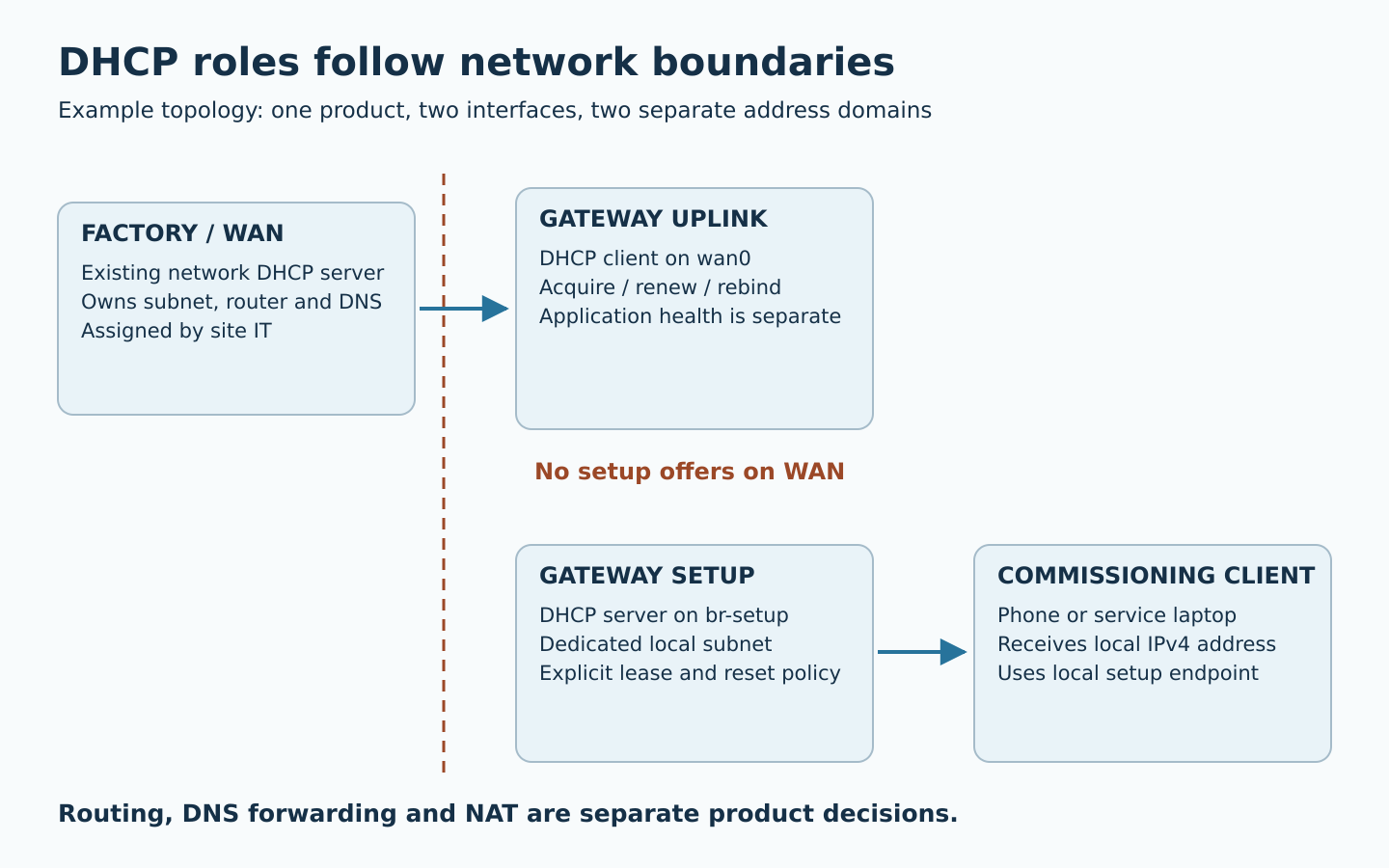
An embedded device needs a DHCP client when it obtains its own IPv4 configuration from another network. It needs a DHCP server when it assigns configuration to downstream equipment or a commissioning phone. A gateway can require both, on separately defined interfaces. The product requirement should name those interfaces, their owners and their failure behavior before selecting a daemon or adding packages to a Linux image.
This guide covers IPv4 DHCP in embedded Linux products. IPv6 router advertisements and DHCPv6 need a separate design. The configurations and acceptance tests below are proposed engineering examples, not results from an Obeita deployment.
Start with the installation topology
“Support DHCP” leaves several incompatible interpretations. A sensor plugged into a factory switch typically acts as a client. A maintenance access point may serve addresses only to a technician’s phone. A routed gateway can obtain a WAN address while serving a separate LAN. A bridge may instead pass client broadcasts to an existing server; putting another server on that bridge would change the entire broadcast domain.
| Product role | Address assignment | Decision to record |
|---|---|---|
| Factory-network endpoint | Client on the uplink | IT owns subnet, lease and DNS policy |
| Local commissioning AP | Server on the setup interface | Local-only access or Internet forwarding |
| Routed equipment gateway | WAN client and LAN server | Separate subnets and explicit forwarding policy |
| Transparent bridge | Existing network server serves attached clients | Management address and broadcast boundaries |
Label physical ports as well as Linux names. A PCB change, USB adapter or driver update can change enumeration. Store the intended relationship between connector, MAC address, bridge/VLAN membership and network role in the release documentation.
Specify what the client must do after the first lease
The initial allocation normally involves discover, offer, request and acknowledgement. A leased address then has a lifetime, renewal and rebinding behavior; a device must not continue treating an expired lease as valid. These transitions are defined in RFC 2131. Acceptance should exercise the later transitions, not stop after a successful cold boot.
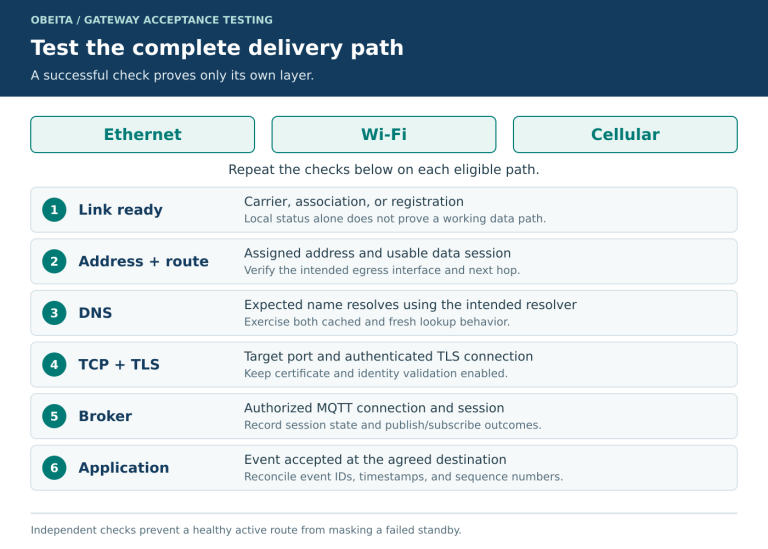
Define an application-visible state model: link unavailable, obtaining configuration, address valid, local network reachable and application endpoint reachable. A DHCP acknowledgement establishes configuration; it does not verify DNS, Internet access or your MQTT service. Give the UI and diagnostic log enough detail to tell these states apart.
The network owner should decide whether the client accepts a default route and DNS settings, what identity it sends, and whether it supports a reservation. Record option expectations such as subnet mask, router and DNS server against RFC 2132. Avoid making a product depend on a particular address unless that requirement is coordinated with site IT.
For multi-interface devices, specify route preference and DNS ownership. Two network managers on the same interface can overwrite each other’s addresses. Two valid leases on different interfaces can still install an unintended default route. Pick one configuration owner per interface and test it alongside any cellular manager, static service port and container bridge.
Keep the server inside its authorized segment
A setup server should start only after its interface has the intended local address. Restrict its listening interfaces and verify that offers never escape onto the factory uplink. A wildcard listener plus an accidental bridge can become a rogue DHCP server. Firewall rules are an additional boundary, not a substitute for correct interface ownership.
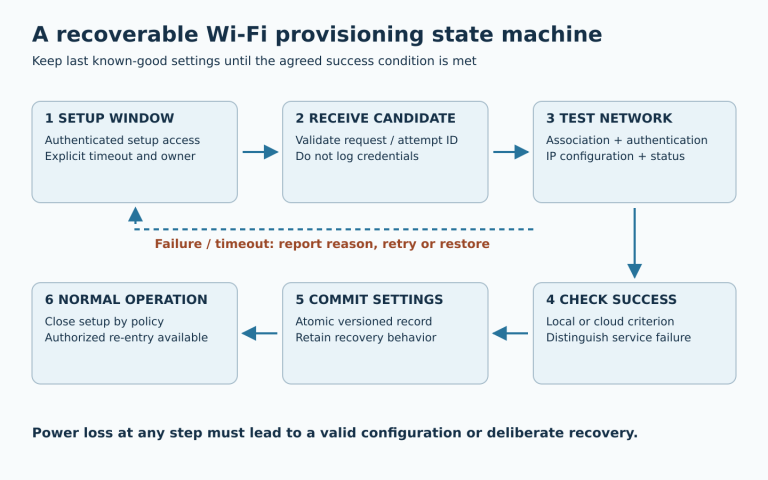
Separate address assignment from routing, DNS forwarding and NAT. A phone receiving an address does not imply that the gateway can provide Internet access. For local-only setup, choose how the app reaches the device when the phone labels the Wi-Fi network “no Internet”; validate the documented manual access method even if a captive portal is provided.
The following illustrative dnsmasq fragment serves a dedicated setup segment without advertising a default router or DNS server. It assumes a separately configured br-setup address of 192.168.77.1/24, no connection to another DHCP-served segment, and an existing writable lease directory. Check options against the installed version’s dnsmasq manual. This is a lab starting point, not a complete network or security configuration.
# Dedicated local commissioning interface only
interface=br-setup
bind-interfaces
port=0
dhcp-range=192.168.77.20,192.168.77.60,255.255.255.0,10m
dhcp-option=3
dhcp-option=6
dhcp-leasefile=/data/dhcp/setup.leases
If the product must route Internet traffic, specify that separately and supply the correct router/DNS options. If interfaces are created dynamically, test daemon start/restart behavior rather than assuming binding remains correct. Confirm the selected downstream subnet does not overlap the upstream subnet; provide a controlled change workflow if it does.
Define conflicts, exhaustion and persistent identity
Lease-pool size must include concurrent clients, stale leases and commissioning churn. Phones may use private Wi-Fi addresses, so a physical phone need not retain one MAC identity forever. Rate-limit abusive request traffic, and define what an installer sees when the pool is full.
Decide whether server leases survive reboot. Losing the lease database does not guarantee an immediate collision, but it changes the information available for safely reusing addresses. Store it with the intended persistence policy and test reboot while existing clients remain online. Do not casually erase all device settings to recover one DHCP problem.
Duplicate IPv4 addresses require a visible fault and a recovery policy. RFC 5227 describes address-conflict detection using ARP. Check what your actual client/server stack implements and capture the conflicting traffic. A successful ping from one machine can hide the other host intermittently answering for the same address.
Use a failure-oriented acceptance matrix
| Injection | Observe | Proposed pass condition |
|---|---|---|
| Server absent at boot, then restored | Retry timing, CPU, application state | Bounded resource use; automatic acquisition within the agreed recovery budget |
| Short test lease; block renewals, then all replies | Renew/rebind/expiry transitions | No application use of an expired lease; no reboot required after service returns |
| DHCP changes router or DNS | Routes, resolver and existing connections | New configuration applied; connections re-established according to application policy |
| Server reboot with active clients | Lease database and duplicate allocation | No duplicate assignment in the tested population |
| Pool exhausted or conflicting static host | Logs and installer response | Specific fault reported; defined recovery without corrupting unrelated settings |
| WAN and setup AP active together | Captures on both interfaces | Setup DHCP offers confined to the intended segment |
Choose timing thresholds from installation needs and supported lease values. Report the lease duration, firmware version, daemon configuration, router model and test client OS with every result. For a DHCP server, repeat with the supported phone/laptop families; one successful laptop is weak evidence for a mobile commissioning workflow.
Troubleshoot the first missing transition
Capture one interface at a time in an authorized lab. These commands are diagnostic examples; interface names and available utilities vary by image:
ip -br link
ip -4 address show dev eth0
ip -4 route show
tcpdump -ni eth0 -vv 'udp port 67 or udp port 68 or arp'
No discover suggests an interface, process or configuration-owner problem. A discover without an offer points toward VLAN, server, relay or filtering. An acknowledgement without a usable address suggests a client hook or network-manager integration issue. A valid address with failed hostnames calls for DNS checks; successful DNS with a failed service calls for application diagnostics. Preserve timestamps and transaction IDs, and redact client identifiers before sharing captures outside the project.
Turn the topology into a delivery scope
Obeita’s device connectivity service is a starting point for defining interface roles and network acceptance. The delivered RK3528 network gateway project illustrates a platform with distinct Ethernet paths and proposed LAN/WAN roles; it does not establish tested DHCP behavior for your network.
For an assessment, provide the connector/VLAN diagram, client population, site DHCP constraints, local-setup requirements and current image. Agree on the configuration owner, fault messages, capture procedure and test matrix before “DHCP supported” becomes a delivery checkbox.