LVGL 8 to 9 Migration: Fixing Black Screens, Buffer Sizes and Color Formats
Freeze the version and the failure
A project can compile after an LVGL upgrade and still send the wrong bytes to a perfectly healthy panel. Start by separating four observations: no visible pixels, consistently wrong colors, damaged rectangular regions, and memory faults. Record when the first incorrect frame appears and whether a static screen stays correct. A photograph alone rarely identifies which boundary failed.
This guide compares LVGL v8.3.11 with v9.3.0. Keep the board, panel initialization, bus clock and test image unchanged while rebuilding the display port. Save both library tags, compiler flags, linker map and lv_conf.h. The target here is a repeatable correct image; this is a source-reviewed diagnostic method, with no board test or measured performance claim.
Rebuild the display configuration deliberately
Treat the display port as a contract with resolution, storage, pixel interpretation and completion rules. The v8 driver structure and draw-buffer initialization are replaced by display-object configuration in v9. The official major-version migration notes explain the conceptual changes; the v8.3.11 header and v9.3.0 header define the exact interfaces used here.
Begin with the target tag’s configuration template and review each local override. A compatibility alias may restore a symbol name, but it cannot prove that a buffer size still uses the same units. Keep a short migration ledger: old setting, new responsibility, test that proves it. Also confirm that the LVGL tick and timer handler run, the intended screen belongs to the intended display, and allocation failures are visible instead of silently producing a black screen.
Recalculate capacity and row layout
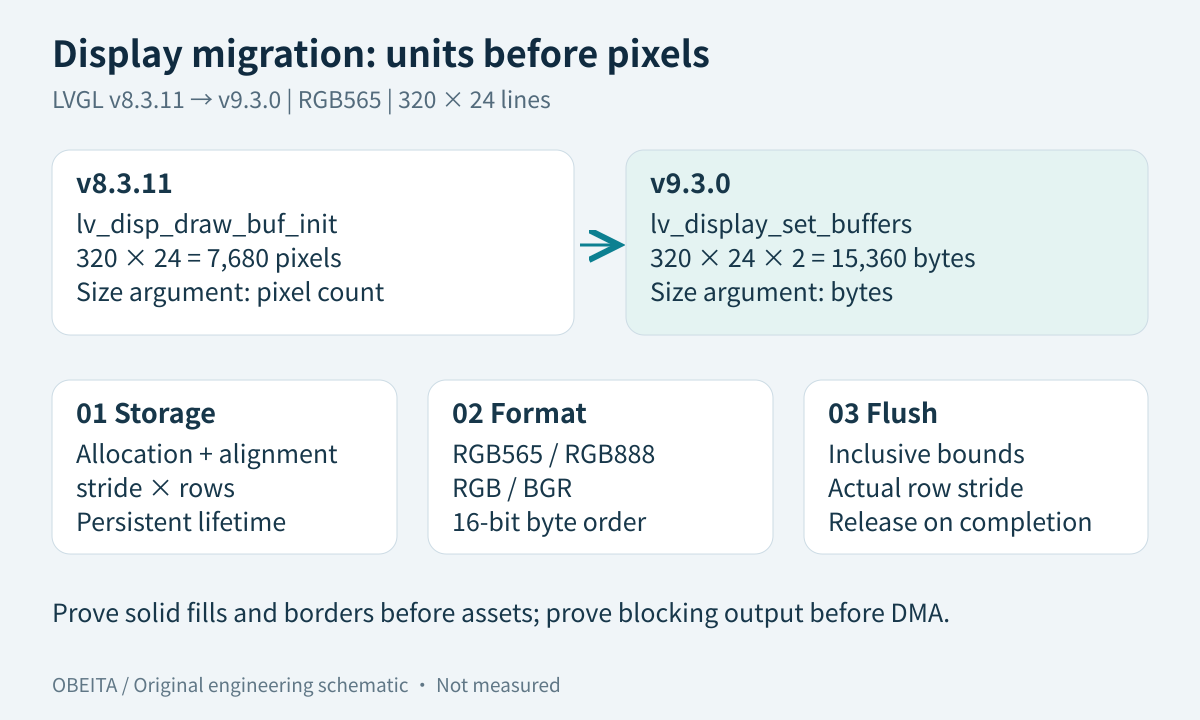
For packed RGB565, 320 pixels across 24 lines require 320 × 24 × 2 = 15,360 bytes. The corresponding v8 draw-buffer size argument is a pixel count, 7,680; the v9 lv_display_set_buffers argument is bytes, 15,360. Passing the old count under-reports capacity. Passing a larger invented size is worse: the renderer may trust memory that was never allocated.
| Check | Example or decision | Evidence to retain |
|---|---|---|
| Allocation | 15,360 bytes for packed 320 × 24 RGB565 | Declaration and linker allocation |
| API capacity | sizeof the actual storage, in bytes | Value passed to v9 |
| Stride | 640 bytes only if rows are packed | Configured stride and row offsets |
| Full-size modes | 320 × 240 × 2 = 153,600 bytes per buffer | Mode, actual allocation and alignment |
Padding changes the calculation to stride × stored rows. Do not use sizeof(lv_color_t) as a universal output-pixel size: v9’s color representation and a display’s chosen pixel format have different roles. Check the pinned color definitions. The driver must advance rows using the actual layout; narrow dirty rectangles are especially useful for exposing a hidden full-width stride assumption.
Align pixel format with the wire
Test solid red, green, blue, black and white, followed by a gradient with distinct neighboring values. RGB565 versus RGB888, RGB versus BGR, and the byte order of a 16-bit RGB565 value are separate questions. A red/blue exchange suggests channel interpretation; widespread odd colors can indicate byte order or an incorrect pixel width. Record raw buffer bytes and transmitted bytes before choosing a correction.
Set the display color format explicitly before configuring its buffers. Apply any required byte swap at one documented boundary only, preferably using a peripheral feature when it matches the port. Repeatedly swapping a persistent framebuffer in place can corrupt later partial updates. Image assets also have format and converter-version requirements, so first prove the panel with generated solid fills before importing an entire old asset library.
Isolate a synchronous flush path
Use a known blocking panel write to test coordinates, byte count and completion independently of DMA. LVGL rectangle endpoints are inclusive, so a region ending at x2 has width x2 − x1 + 1. A one-pixel border catches missing last rows and columns. The following is illustrative pseudocode shaped around v9.3.0 APIs, not a compiled board driver; alignment, error recovery, row stride and panel functions must be supplied by the port.
storage = persistent_aligned_storage(320 * 24 * 2)
display = lv_display_create(320, 240)
require(display != NULL)
lv_display_set_color_format(display, LV_COLOR_FORMAT_RGB565)
require(actual_capacity(storage) == 15360)
lv_display_set_buffers(display, storage, NULL, 15360,
                       LV_DISPLAY_RENDER_MODE_PARTIAL)

flush(display, area, pixels):
    rows = area.y2 - area.y1 + 1
    columns = area.x2 - area.x1 + 1
    require(valid_rectangle(area))
    send_rows_blocking(area, pixels, columns, rows, actual_stride)
    require(port_finished_reading_source())
    lv_display_flush_ready(display)
Register the flush callback through lv_display_set_flush_cb. A successful queue submission is not proof that the source is free. When switching back to asynchronous transport, use the DMA ownership checklist to define the real release event.
Migrate a small asset sample first
Choose one image, an English label, a Chinese label and a screen containing clipped text. Rebuild these resources with a converter version recorded in the release manifest. Keep original source images and font inputs so the generated binary can be reproduced. Verify glyph coverage, transparency and image dimensions separately from the display driver.
If solid fills and borders are correct but only an image is damaged, inspect that resource’s descriptor, compression or decoding path before changing global panel settings. If text boxes occupy the right area but characters are missing, examine font coverage and encoding. Compare a captured framebuffer with a photograph when possible: a correct buffer and incorrect panel output place the remaining work downstream of rendering.
Accept correctness with repeatable inputs
Use six cases: solid colors, color bars, edge rectangles, long bilingual text, a small moving dirty region, and repeated page transitions. For each, retain a reference image, expected dimensions, firmware identifier and observation method. Run cold starts and repeated screen changes; a single clean first frame cannot expose stale storage or lifetime errors.
Close each ledger entry with evidence or an explicit limitation. Keep the old working image and its flashing procedure available until the new build passes the agreed cases. Timing numbers collected here are only a baseline; continue with frame-time and bandwidth profiling after correctness is stable. If the panel path itself has never worked on a Linux board, establish the board bring-up baseline first.
For a scoped firmware and BSP diagnostic review, prepare the two LVGL tags, board and panel details, sanitized configuration, minimal flush code and a short reproduction. These materials make a migration estimate more useful than an isolated black-screen photograph.