EEZ Studio Loop: Check Start, Next and the Inclusive End Condition
An EEZ Studio Loop can look correct on the canvas while restarting on every iteration or ending one value later than expected. The reliable starting point is to distinguish its Start input, its Next input and the bound check that decides whether the body or done output runs.
The Loop documentation describes the two inputs. The pinned implementation discards existing loop execution state when Start is present. Next advances an existing loop; an entry without Start and without existing state returns without beginning a new loop.
The implementation is framework commit dc9af2d5004201d6c31273a4c4fcfe27fc20c234. Check the project's actual runtime against that reference; the EEZ Studio v0.29.0 editor reference does not establish the bundled runtime revision. The examples below concern standard EEZ Flow and nonzero, direction-consistent steps.
Trace one small loop by hand
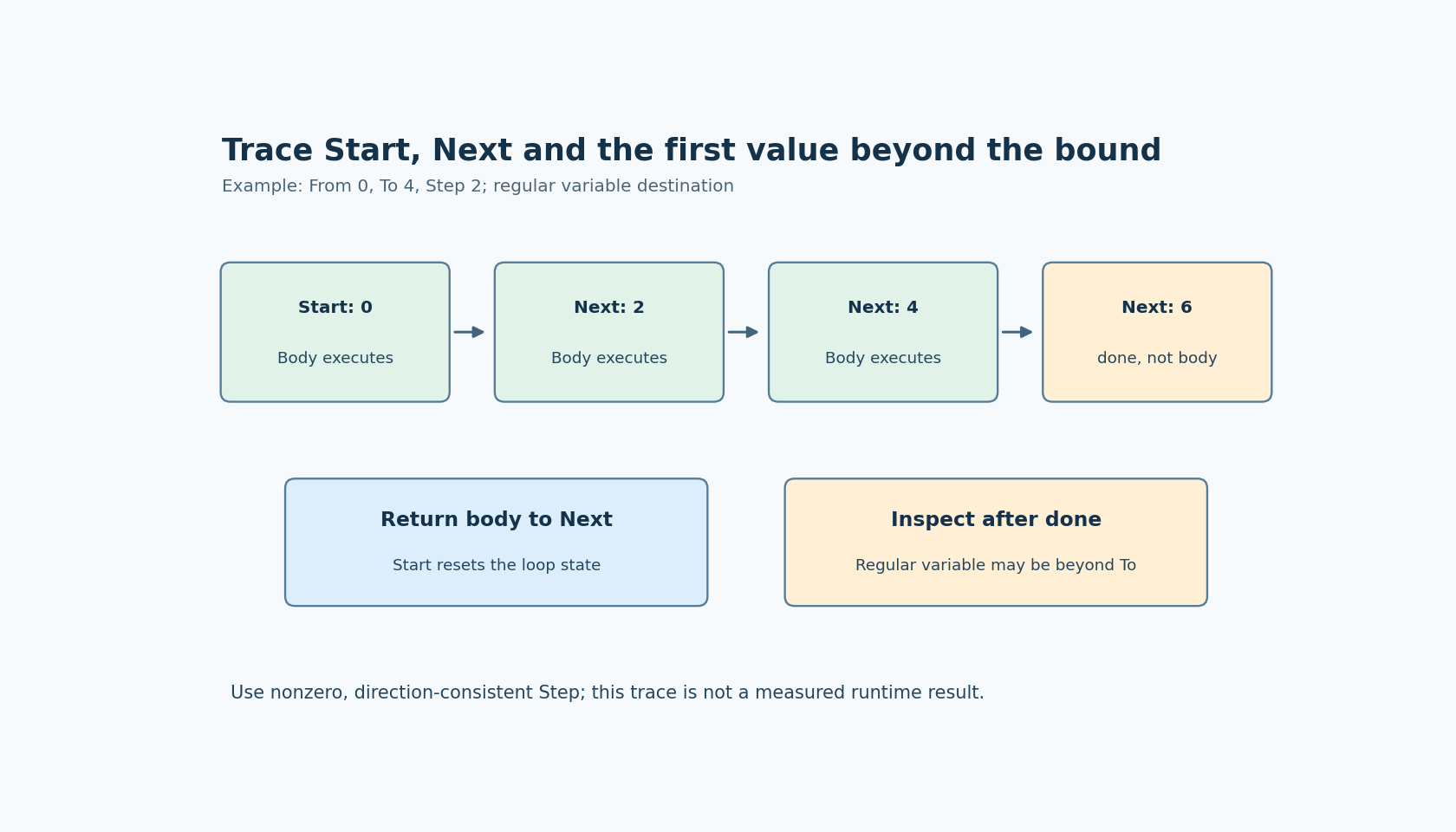
Choose From = 0, To = 4 and Step = 2. Start establishes the first body value, 0. Returning to Next advances to 2, then another return advances to 4. A subsequent Next advances beyond the bound and takes done.
The endpoint is included when the sequence lands on it. In the inspected code, a positive-step loop finishes when the current value is greater than To, not when it is equal. For a negative step, it finishes when the current value is less than To. Thus From = 4, To = 0 and Step = -2 gives the corresponding body values 4, 2 and 0.
Use these concrete traces rather than copying a prose iteration-count formula into application logic. They expose the input sequence and endpoint directly. If Step does not divide the interval evenly, the last body value can be short of the bound; the next advance then crosses it.
Return the body to Next, not Start
For ordinary iteration, the body completion path should return to Next. Sending it back to Start requests a new loop state and re-evaluates the beginning of the loop. A diagnostic output that repeatedly shows From is a reason to inspect this connection before changing arithmetic.
Keep the initial trigger distinguishable from the return path. Label the body-completion connection according to its role and inspect copied diagrams carefully. A loop copied into a larger User action can acquire a second Start source that was not present in the minimal example.
Also test what happens if the product intentionally requests a restart while an earlier body operation is still active. The source shows a reset of Loop state; it does not automatically cancel external work launched by the previous iteration. Those two lifetimes need an explicit product policy.
Inspect the variable after done separately
In the inspected implementation, a regular assignable destination receives the current value before the termination comparison. That means the value stored after done can be the first value beyond the bound. In the 0-to-4 example, that value is 6, even though 6 was not a body iteration.
Do not use the final variable as proof that the body ran at that value. Log the values when the body actually executes. If downstream code needs the last accepted iteration value, preserve it at that point rather than assuming the loop variable remains there after completion.
The implementation has a separate path for a Flow-output destination, so do not generalize every regular-variable observation to every destination kind. Include the actual configured Variable form in the regression case.
Decide which parameters may change mid-loop
The inspected code stores To when the loop is initialized but evaluates Step on each execution. Editing the variables behind those expressions during a running loop can therefore have different effects. Treat them as different contracts rather than assuming all loop properties are continuously live.
For a fixed iteration plan, snapshot the desired parameters in application-owned values before Start and avoid modifying them during the cycle. For an intentionally adjustable step, test the effect on direction and termination. A sign change or zero step needs a deliberate rule; this article does not claim the runtime rejects every unsafe combination for you.
Validate a nonzero step and a direction appropriate to the requested interval before starting. That is a proposed application guard, not a description of built-in validation.
Test termination and abandonment
Count body entries and done entries independently. Include equal endpoints, ascending and descending intervals, and an interval not evenly divisible by Step. These cases distinguish inclusive bounds from accidental extra body execution.
Then inspect the application's cancellation behavior. Simply ceasing to return to Next is not evidence that every related resource or external operation was cleaned up. A stopped iteration path and a completed operation are different outcomes.
No loop was executed for this article. The hand traces are derived from the pinned source and should become explicit expectations in the project's own runtime test. They make Start, Next, body values and post-completion state observable instead of hiding all four behind a single loop-count assumption.