Yocto Kernel Modules: Package the Module for the Kernel ABI Actually Deployed
An out-of-tree module builds successfully, but the device rejects it after an image update. The recipe may have compiled against a different kernel build, the root filesystem may carry a different module package, or the bootloader may still start the previous kernel.
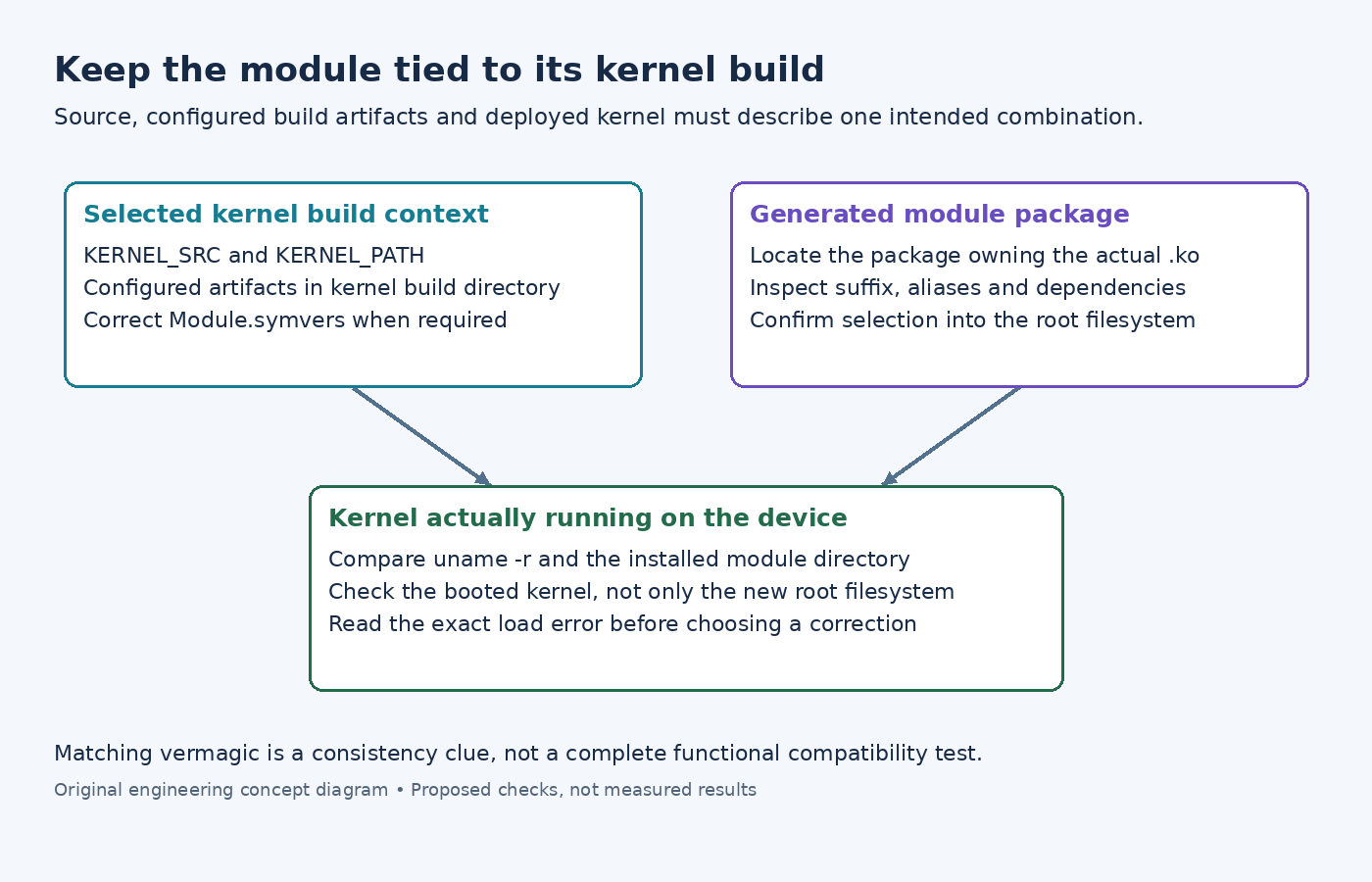
Investigate the kernel build context and the deployed combination before changing the driver's source. A .ko file is not interchangeable merely because two devices report the same processor family.
Use the kernel context supplied by the recipe classes
The Yocto 5.0.12 out-of-tree module guide describes recipes inheriting module and Makefiles that use KERNEL_SRC or KERNEL_PATH. Those variables point at staged information for the selected kernel, rather than an arbitrary host header directory.
Read the actual compile command in the module task log. If the upstream Makefile ignores the supplied variable and instead searches /lib/modules on the build host, correct that Makefile interface. A successful host-side lookup can otherwise select entirely unrelated headers and configuration.
The examined module class passes kernel-specific compiler tools and O=${STAGING_KERNEL_BUILDDIR}. The accompanying module-base class identifies that directory as the main kernel's build artifacts, not the external module's own ${B} directory.
This source/build separation matters for configured headers and generated kernel information. Copying a source tree alone is not equivalent to using the configured kernel build selected by the product.
Check symbol-version information when required
The Linux 6.6 external-module documentation describes CONFIG_MODVERSIONS as a consistency check using exported-symbol CRCs. Module.symvers supplies exported-symbol information to module postprocessing.
The same document warns that modules_prepare does not generate Module.symvers, even when versioning is enabled. A full kernel build is needed for that information. If module construction reports missing or mismatched symbol information, verify that the expected kernel artifacts were produced and used; do not substitute a similarly named file from another build.
For an external module that depends on another external module, also trace the supplying module's symbol information. That dependency is more specific than both recipes merely depending on the same kernel source.
Follow the generated package into the image
A module recipe name does not necessarily equal the package that owns its .ko. The examined kernel-module-split implementation creates module packages, normally adds a kernel-version suffix, and can provide an unsuffixed alias. It also derives module dependencies from module metadata.
Inspect the actual generated package name, its dependencies and its installed module path. Then confirm that the image includes that package. Finding a module in the build output does not show that rootfs dependency resolution selected it.
Compare the running device's uname -r with the module directory and intended kernel release. If they differ, investigate deployment and boot selection before rebuilding the module repeatedly. A new root filesystem alongside an old boot partition can create this mismatch even when each artifact was built correctly.
Treat version strings as evidence with limits
The Linux v6.6 vermagic definition combines the kernel release with selected configuration and architecture indicators. It is a useful mismatch clue, not a complete identity of every kernel source change or a functional driver test.
Inspect the module's metadata with the target's available module-inspection tools and read the kernel diagnostic from the failed load. Distinguish an unavailable file, a dependency or symbol problem, a version mismatch, and a separate module-signature policy rejection. Those observations lead to different fixes.
Do not force a mismatched module to load as the routine solution. Restore a consistent kernel/module combination, then test the driver's actual device binding and required operations. Loading successfully only establishes that the kernel accepted the module; it does not prove that the driver behaves correctly with the attached hardware.