Profiling LVGL 9 Display Performance: Partial Refresh, Bus Bandwidth and Frame Time
Define the kind of slow that matters
A smooth animation can coexist with sluggish touch response, and a good average FPS can hide an occasional long pause. Choose the product’s acceptance metric before tuning: update duration, high-percentile frame time, worst observed stall, or touch-to-visible latency. Specify which screen and interaction each metric describes and what counts as an incomplete or incorrect update.
Use LVGL v9.3.0 for the experiment. If comparing a migration from v8.3.11, hold the board, panel, assets and input sequence constant and document unavoidable differences. Record compiler optimization, CPU and bus clocks, memory location, color format and enabled rendering features. This guide provides calculations and a measurement plan; no board has been benchmarked and no configuration is claimed to be fastest.
Place probes along the whole display path
Separate UI updates and layout, drawing or decoding, source-buffer transfer, and hardware waiting. Record timestamps with one monotonic clock where possible. Measure the logger’s cost and dropped-event count; store compact records and format them afterward. A serial print in every flush can dominate the result on a small MCU.
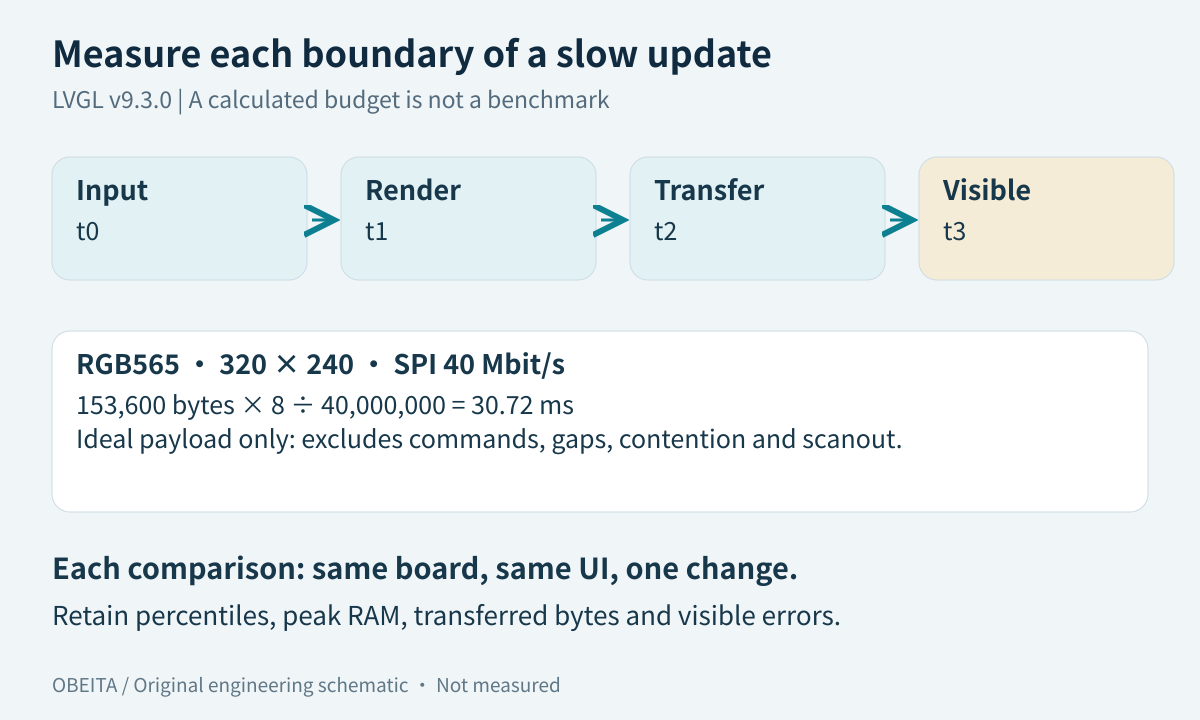
Use events available in the pinned source, a port-side trace or GPIO observed with external equipment. The v9.3.0 display API exposes display events and completion integration, but a flush-ready timestamp does not establish when the changed pixel became visible. For interaction latency, define input sampling and the visible endpoint, such as a photodiode transition or a suitably calibrated video observation. Keep the uncertainty of that method with the result.
Count complete logical updates separately from flush calls: one update may be split into several rectangles. A counter that calls each rectangle a frame can make a smaller draw buffer appear faster without improving the screen.
Calculate a bus budget from actual changed areas
A 320 × 240 RGB565 image contains 153,600 payload bytes. For an illustrative single-data-line SPI link at 40 Mbit/s, the ideal payload time is 153,600 × 8 / 40,000,000 = 30.72 ms. This excludes commands, gaps, chip-select overhead and shared-bus contention. It is a lower bound for that transfer assumption, not a predicted FPS or a measured effective throughput.
If only a 64 × 32 rectangle changes, its packed payload is 4,096 bytes and the same ideal arithmetic gives 0.8192 ms. Actual dirty-area merging, alignment and repeated transfers may increase traffic. Count transmitted bytes and bus-active time rather than assuming the visible widget area equals the transferred area.
| Workload | What to count | Decision supported |
|---|---|---|
| Small status value | Rectangles and bytes per change | Find oversized invalidation |
| Full-screen animation | Payload plus bus gaps | Estimate transport ceiling |
| Scrolling text | Draw time and dirty-area growth | Separate glyph work from copying |
| Page transition | Allocation, decode and transfer tails | Locate occasional long stalls |
Report effective payload bandwidth over an explicitly defined interval. Bus-active throughput and end-to-end update throughput answer different questions, especially when drawing overlaps DMA.
Choose render mode and buffer size for the interface
In the v9.3 display setup guide, partial mode uses smaller drawing buffers, direct mode maintains screen-sized buffers with changed-region rendering, and full mode redraws the full screen. A framebuffer scanout controller and a command-driven SPI panel expose different opportunities; changing the enum alone does not create a compatible display port.
Budget storage from actual stride, height and buffer count. For the example above, two packed full-screen RGB565 buffers require 307,200 bytes before alignment and other allocations. Two 24-line buffers require 30,720 bytes. Smaller buffers can increase transaction count; larger buffers can consume scarce RAM without reducing the dominant delay.
Sweep a small set of feasible line counts while preserving color format and workload. Record peak memory, number of flushes, CPU idle or wait time and overlap. Direct-mode synchronization between buffers also has work to account for. Treat double buffering as a candidate to measure, not an automatic speedup.
Measure assets and UI work separately
Disable one expensive visual operation at a time in an experimental branch: shadows, opacity blending, scaling, rotation or compressed-image decoding. Compare drawing time and visible quality. Label such experiments as changed workloads when the output differs; a stripped-down interface cannot be presented as an equivalent optimization.
For text, hold the input string sequence constant and record changes in length, wrapping and layout. For page creation, distinguish first-use allocation or decoding from steady-state movement. Test a cache-warm run and a defined cold-start run, because averaging them together obscures the source of pauses.
Keep the application’s data-update rate visible. Repeatedly assigning identical values, recreating static widgets or invalidating a large parent can waste work before the transfer stage begins. Confirm each hypothesis with event counts and timing rather than inferring it from a low overall FPS.
Run a same-board A/B experiment
Give each candidate one change and a build identifier. Replay the same input sequence, use the same measurement interval and repeat it enough times to characterize variability. Predeclare how warm-up is handled. Retain individual samples, sample count, median, a relevant upper percentile and the maximum observed duration; the maximum is an observation, not a proven worst-case bound.
Also record peak RAM, visible errors and operating conditions such as power mode and temperature when they can alter clocks. If a candidate drops updates, reduces precision or increases input lag, those costs belong beside any timing improvement. Rerun the baseline after the candidate when drift is plausible.
Before trusting DMA results, verify the buffer ownership and cache contract. Before comparing versions, finish the migration correctness checks. Timing a corrupted or incomplete frame does not satisfy a display acceptance criterion.
Turn measurements into an optimization order
Choose the next change from the dominant measured stage. Oversized dirty regions suggest checking invalidation and UI update logic. Long draw time suggests resource or effect analysis. Long bus occupancy suggests reducing transferred area or reviewing interface capacity. Large waits with available bandwidth point toward scheduling or synchronization. The appropriate order follows evidence and implementation cost, not a universal list of “fast” flags.
Save a reusable run record with firmware ID, scenario, probe definitions, raw sample location, byte count, latency statistics, peak memory and visual verdict. Keep the baseline workload in regression testing so future UI changes do not silently consume the recovered margin.
For a firmware performance review, bring the screen resolution, interface, RAM budget, target interaction latency and an export of existing traces. Without those measurements, the useful deliverable is a bounded experiment and a bandwidth budget, not a promised percentage improvement.